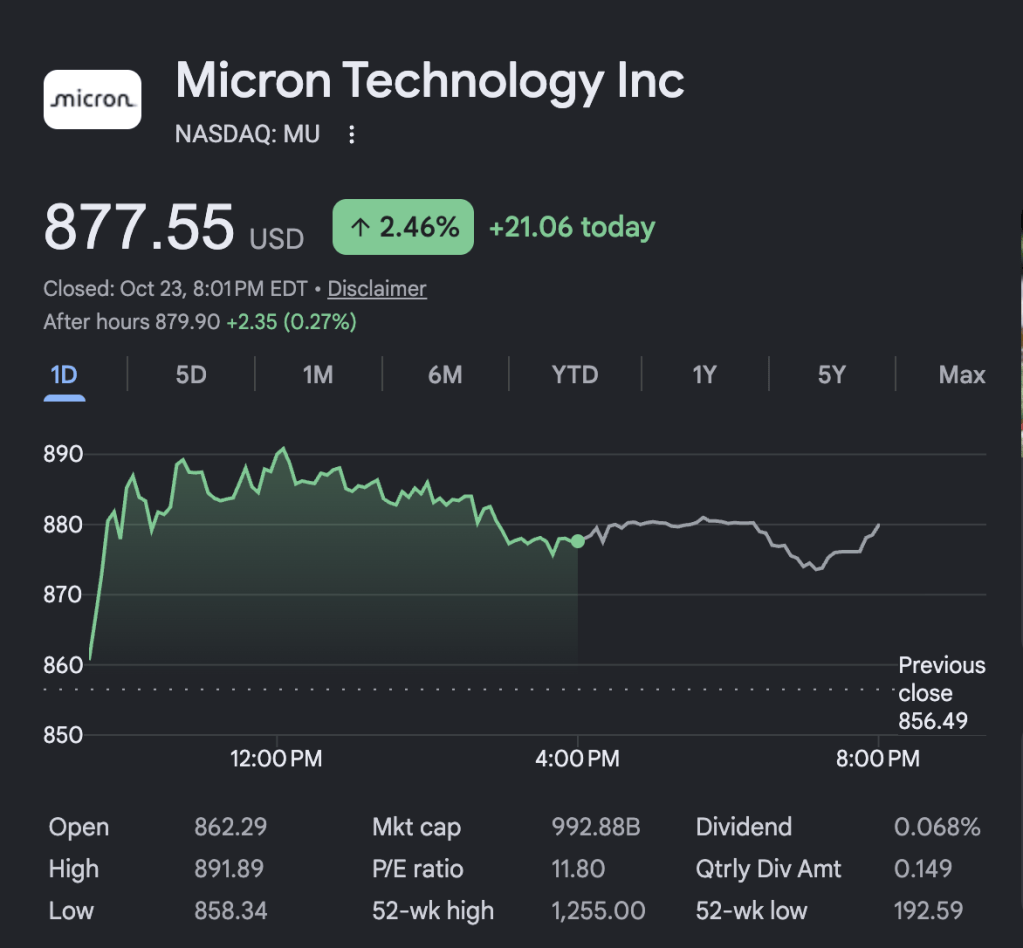
Ken Griffin says we’re “almost certainly” in an AI bubble. Meanwhile, Micron is trading at 12 times earnings. Google is at 16. Is Big Tech dirt cheap?
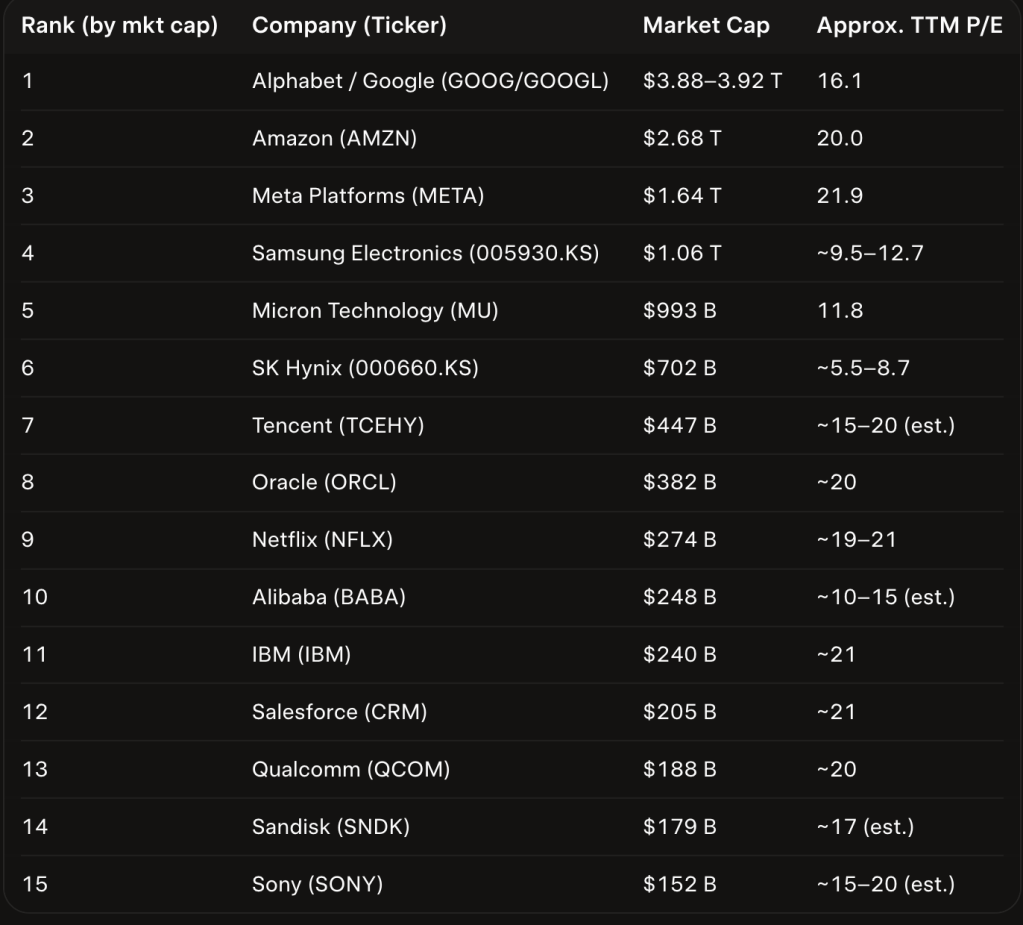
Of the 50 largest tech companies in the world by market cap, 15 are trading at a PE ratio of 25 or less.
PEs this low for high-quality companies are rare.
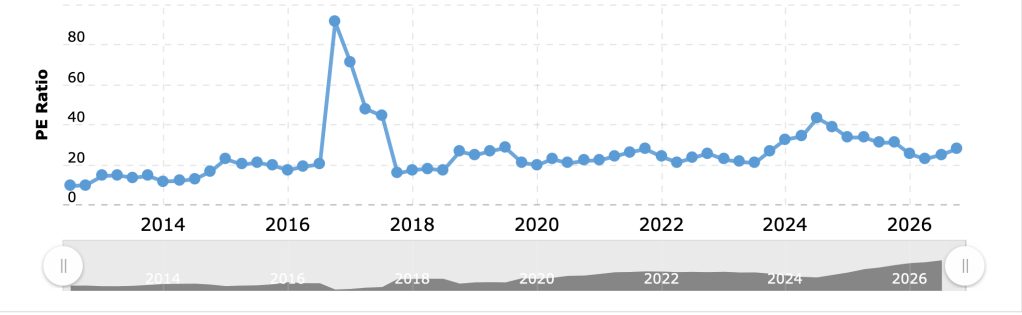
If we look at the PE ratio for the Nasdaq 100, we see valuations trending down over the last two years. Overall, PE’s look historically normal, and well below the peak in late 2016.
Zooming in on specific stocks, the deals get even better.
From Memory to Hyperscalers, Cheap Stocks Abound
The memory chip makers have multi-year contracts locking in a significant portion of revenue. And even if their profits fall, their PEs would still be reasonable.
Let’s look at some stocks that are less cyclical: companies like Google, Amazon and Meta.
All are trading for 16-22 times earnings. All are growing earnings in the 10-30% range yearly.
That’s amazing growth at that scale. Buying into growth like that for such low multiples is a rare opportunity.
Not Everything Is On Sale
Not every major tech company is cheap.
Apple is at 40 times earnings. Tesla is over 400! Investors are running toward hardware in hopes it will provide a moat from AI.
The market is not rock bottom. But as a whole, prices are reasonable.
Digging into specific stocks, there are some unusual bargains.
Wrap-Up
The AI trade has a long way to run. But as worries mount, many of the leading companies are surprisingly cheap.
Alphabet or Meta could double without increasing earnings a cent. This would provide an enormous tailwind to markets.
AI today reminds me of medical software when I joined the industry in 2005.
“Am I too late?” I wondered.
I had no idea how early I was. The market kept expanding at warp speed for a decade.
Why is SpaceX able to launch cargo for so much less than other providers? Because of its reusable rockets.
Using a $4 million Patriot missile to intercept a $50,000 drone gets expensive. But what if we could reuse the drone interceptor?
That’s what Keres is building. Their reusable jet interceptors destroy a drone and then come back to base, ready to destroy another.
Founder Christopher Palazzolo comes from Boom Supersonic, the startup making a supersonic airplane. That’s the strong technical background I’m looking for!
Hurricane Isaias hit Florida recently, knocking out power and destroying homes. My friend Jesse Bray was in the thick of it. Not knowing how to help, he fell back on what he knew: building software.
Here’s how Jesse built an app that is helping countless families affected by hurricanes…
By Jesse Bray
On October 9, a hurricane tore through our part of the Florida Panhandle.
Then the power went out.
Our food was ruined. We had no water, no electricity. Bills and debt were piling up. I had three little ones depending on me, and I was trying to hold myself together while wondering how we were going to get through it.
A few days later, I was waiting in line at a mobile food pantry.
That sentence still feels strange to write.
I’m a builder and a business owner. I’m usually the person trying to solve the problem or help someone else navigate it. Suddenly, I was the person sitting in line because my family needed food.
It was humbling.
It was also frightening.
When everything gets wiped out at once, your mind starts running in a hundred directions. What are we going to eat? When will the power return? What happens to the next bill? Who is offering help? Do we qualify? Where do we go? Which information is current?
The resources may exist, but they are scattered across government websites, nonprofit pages, local news reports, Facebook groups, and word of mouth.
Finding them becomes another job at precisely the moment you have the least energy to do it.
Standing in that line, anxious and overwhelmed, I did what I have always done when the world stops making sense.
I started building.
Art Therapy for a Software Guy
Some people paint. Some people journal. Some people work with their hands.
Apparently, my version of art therapy is building software on my phone during a disaster.
I started creating an app that could help people find assistance, resources, and support after a hurricane. I worked on it from my phone, with limited internet connectivity, while my family was still without power and trying to recover.
And, credit where it is due: Mint Mobile somehow proved to be disaster-proof.
That thin connection to the outside world was enough to let me keep working.
Building gave all the fear and nervous energy somewhere to go. Every screen I designed and every problem I worked through transformed a little bit of helplessness into something useful.
It was not a startup exercise.
There was no whiteboard session, market analysis, pitch deck, or carefully planned development sprint.
There was a hurricane.
There was a food line.
There was my phone.
And there was the growing conviction that families going through this should not have to work so hard just to find help.
The Tool I Needed Right Then
I called it AfterStorm.
AfterStorm is a free disaster-recovery app designed to help people find the assistance, information, and support they need after a hurricane.
The idea is simple: when someone’s world has just been turned upside down, give them a clearer place to begin.
One family may need food or drinking water. Another may need shelter, cleanup assistance, or help understanding disaster declarations. Someone else may be trying to document damage, locate local services, or figure out what aid is actually available in their area.
People in those situations do not need another maze.
They need useful information, presented clearly, without forcing them to become experts in the overlapping worlds of federal, state, local, and charitable disaster response.
I began building AfterStorm on Tuesday.
By the end of the week, the web app was live.
The iOS version is already in beta and, depending on Apple’s review process, should be publicly available shortly. Android will follow.
It is free because nobody standing in a food line after a hurricane should encounter a paywall between themselves and information that might help their family.
Designing From Inside the Emergency
I have spent much of my career building technology, but I have rarely built something while experiencing the problem this directly.
That changes how you think about a product.
When the user may be conserving battery power, every unnecessary screen matters.
When connectivity is unreliable, speed matters.
When someone is anxious, exhausted, and surrounded by urgent problems, clarity matters.
When a parent is simultaneously searching for drinking water and trying not to scare their children, simplicity is not merely a design preference.
It is compassion.
Building AfterStorm from inside the emergency stripped away the temptation to make it clever or complicated. The goal was not to impress anyone. The goal was to make the next step easier to find.
That is a very different design brief.
Technology Isn’t the Hero
Software cannot repair a roof, restore the electrical grid, replace a refrigerator full of food, or make a frightened family feel safe again.
People do that work.
Recovery happens because neighbors check on one another. Volunteers distribute meals and water. Utility crews work impossible hours. Churches, nonprofits, businesses, first responders, and government agencies show up. Strangers give what they have because someone else needs it more.
Technology is not the hero of that story.
But it can help people find the heroes.
It can shorten the distance between someone who needs help and someone prepared to provide it.
When you are living through a disaster, even one fewer dead end can matter.
Build From Where You Are
There is a polished version of entrepreneurship in which ideas appear during strategy sessions and products emerge according to carefully managed timelines.
AfterStorm did not happen that way.
It began while I was worried about food, water, power, debt, bills, and my children.
It began in line at a mobile food pantry.
It began on a phone with a fragile connection to the internet because that was what I had available.
Less than a week later, it was helping turn one family’s fear and frustration into something that might make another family’s recovery a little easier.
I wish we had never needed this app.
I wish no family did.
But when the storm passed and I looked at what remained, I realized I still had the ability to build.
So I built the tool I wished had been there when everything went sideways.
I hope you enjoyed Jesse’s story! We’ll be back to our regularly scheduled programming tomorrow. Thanks for reading!
If you want to know what the AI labs are building, look at their job postings. Here are three of the most unusual, from robotics engineers to Khmer language experts…
OpenAI is Building a Consumer Device
OpenAI is building out an entire Consumer Devices team. They’re hiring engineers with experience building on-device inference models.
Is this the iPhone killer?
I’m picturing an AI pendant. But it’s not clear what exact form this consumer device will take.
With fierce competition in coding, a consumer device may be a distraction. But if OpenAI nails it, they could be the next Apple.
OpenAI Robot In Development
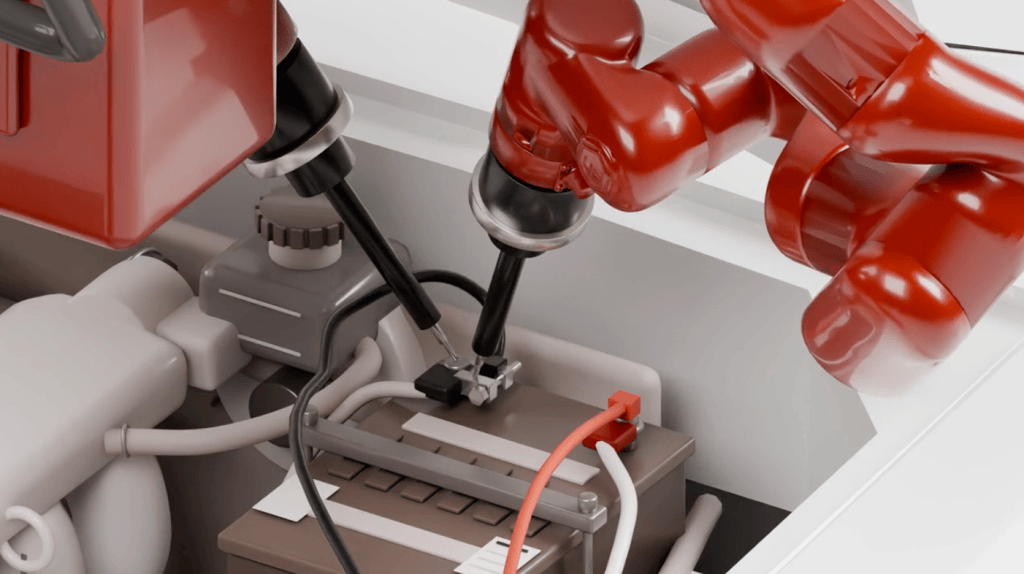
OpenAI has numerous postings for robotics engineers. They may be developing a humanoid.
They want people with experience building printed circuit boards, actuators, and more.
OpenAI won’t just be providing a robotics model. They’ll be making the robot too.
Grok Is Making Voice Models for Obscure Languages
When you think of AI jobs, you probably imagine engineers. But what about an expert in Khmer?
xAI is looking for one to train its voice models. Grok’s voice model will soon be able to speak to anyone in any language.
Imagine aid workers going to a remote corner of the globe.
Today, they may struggle to communicate. In the future, Grok may translate into the local language for them.
Wrap-Up
Every AI lab is trying to do everything.
OpenAI is moving from LLMs to robots and consumer devices. xAI is moving into voice and obscure languages.
Going after too many markets at once could hurt the labs. Lose focus and a competitor can jump ahead, like Anthropic in coding.
That said, the world OpenAI and xAI are building is exciting.
Robots to handle our chores. Superintelligence that can speak to anyone on Earth.
I just made a powerful new tool to help my startups raise money. Here’s how it works…
Building a Tool to Connect My Startups With Investors
I’ve been having the same problem over and over lately.
An awesome startup of mine is raising a round. I want to get them some intros.
So I go to my secret spreadsheet. It has 77 investors I know, along with their check size and the areas they focus on.
But reading through this list is really slow. I also risk missing someone who might be perfect.
So I made an “Investors I Know” tool on Grok Projects.
How “Investors I Know” Works
I fed Grok my secret spreadsheet and told it to enrich the data with info from the internet. I also highlighted my most frequent collaborators.
I told Grok to suggest appropriate folks from both my frequent collaborators and my other contacts.
Now, when I have a startup I want to get intros for, I give Grok some basic info on the company. Grok suggests what investors I should introduce them to.
Finding Investors for a Fictional Startup: ClinicNow
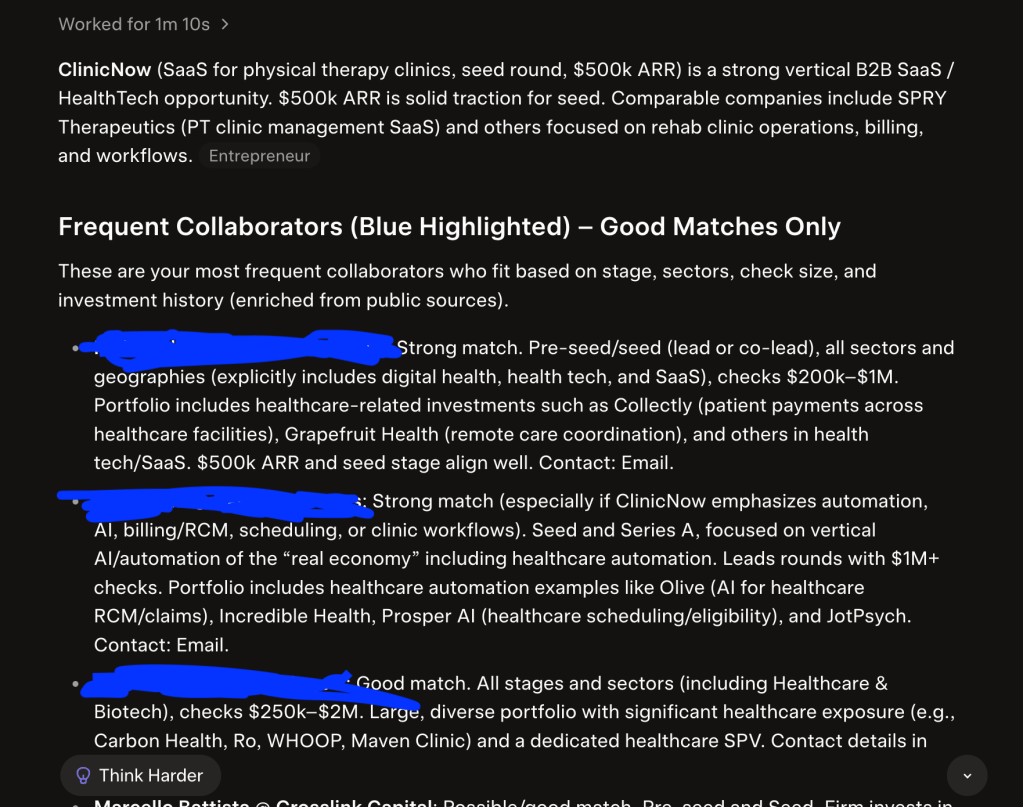
I gave my new tool a test: finding investors for a fictional startup called ClinicNow.
ClinicNow is a seed-stage SaaS company selling to physical therapy clinics. They’re at $500k ARR.
Let’s find them some investors!
Grok suggested some of my favorite VC’s, including the GP of a billion-dollar fund that invests at seed. It also pulled some folks I could’ve forgotten, including a pre-seed healthcare fund I met a while back.
This is where going from spreadsheet to software makes a huge difference. Grok parses the data better than I do and finds intros I would have missed.
Grok Even Drafts the Intro Request E-Mails
Grok found some great intros for ClinicNow. Can it draft intro request emails too?
I asked Grok to write drafts to a couple of the people it mentioned. Grok did a nice job of drafting messages to these investors.
I told Grok to be concise, but the messages were still a bit wordy. I often have that problem with AI. But if I’m more specific with my prompt, I think we can get it right.
Just finding their email addresses and queuing up a message is a big help!
Wrap-Up
My new tool did a great job of finding investors for ClinicNow. I’m excited to use it on some real startups soon!
Building this tool took less than 10 minutes. If it gets even one additional check for a startup, it will be worth it.
If introducing people is a big part of your job, try creating a Grok Project.
Tell Grok as much as you can about the people in your network. Then, ask Grok who you should introduce.
Investors I Know is my new secret weapon to help startups. This simple tool could be the key to closing millions in funding.
We’ve reached artificial superintelligence in coding and math. Physics is next.
AI Is Revolutionizing Coding and Math
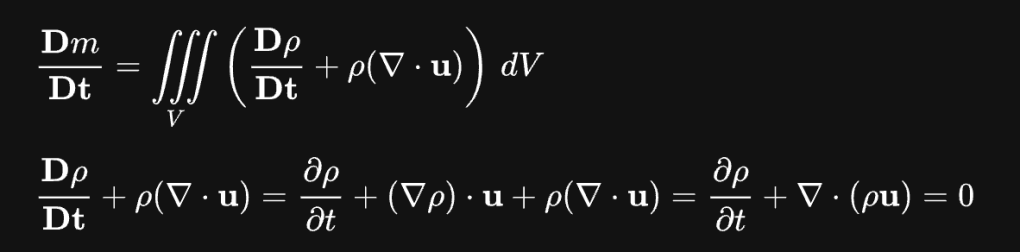
OpenAI recently solved 377 open math problems. That’s after cracking the Navier-Stokes equation just last month.
Earlier this year, Claude found thousands of zero-day vulnerabilities in common software. One was a 27-year-old bug in BSD, one of the most widely used platforms.
All these problems sat in the open for years. Any human being had the opportunity to figure them out.
But no one did.
We’ve reached artificial superintelligence in coding and math. AI is doing work no human can.
The Next Field for Superintelligence: Physics
Coding and math are both bound by rules and highly logical. Both have right and wrong answers.
The next, most similar field is physics.
In 11th grade, I had physics class first period and calculus right after. I was amazed at how similar these classes were.
Physics just took the techniques of calculus and applied them to the physical world. So if AI has reached superintelligence in math, physics can’t be far behind.
Expect to see AI crack long unsolved problems in physics within the next year.
What a Superintelligence for Physics Would Mean
Superintelligence for physics will do a lot more than solve problems. It could create new materials, new types of batteries, even new sources of energy.
It could also help us design better chips. Those better chips could make AI even smarter.
A physics superintelligence could also be used to create new weapons that put us all in danger. But never forget, we’re more than capable of blowing ourselves up with the weapons we have.
Wrap-Up
If physics is the next field for superintelligence, which fields will be last?
Anything where right and wrong is hazy. Think literature, sociology, or politics.
Even some branches of the sciences will resist AI’s grasp. You can’t model biology with the same mathematical precision as physics.
Eventually, ASI will hit every field. But in the meantime, as one area after another falls to the machines, humans will reap enormous benefits.
In a decade, I could be writing to you on a computer with a battery designed by AI that lasts for a month. You could be reading this on an airplane with AI-designed wings that flies at Mach 7.
The emergence of machines smarter than us may be unsettling. But it’s the biggest opportunity of all time.
Jensen just dropped his most powerful open source model ever: Nemotron 3.5 Super VL. It’s as powerful as the frontier models for 10-50x the price.
This morning, I ran the new Nemotron through a three round test. From text summarization to coding, Nemotron blew me away.
Round#1: Summarizing an Article
One common task for AI is summarizing text. Can Nemotron produce great text summaries?
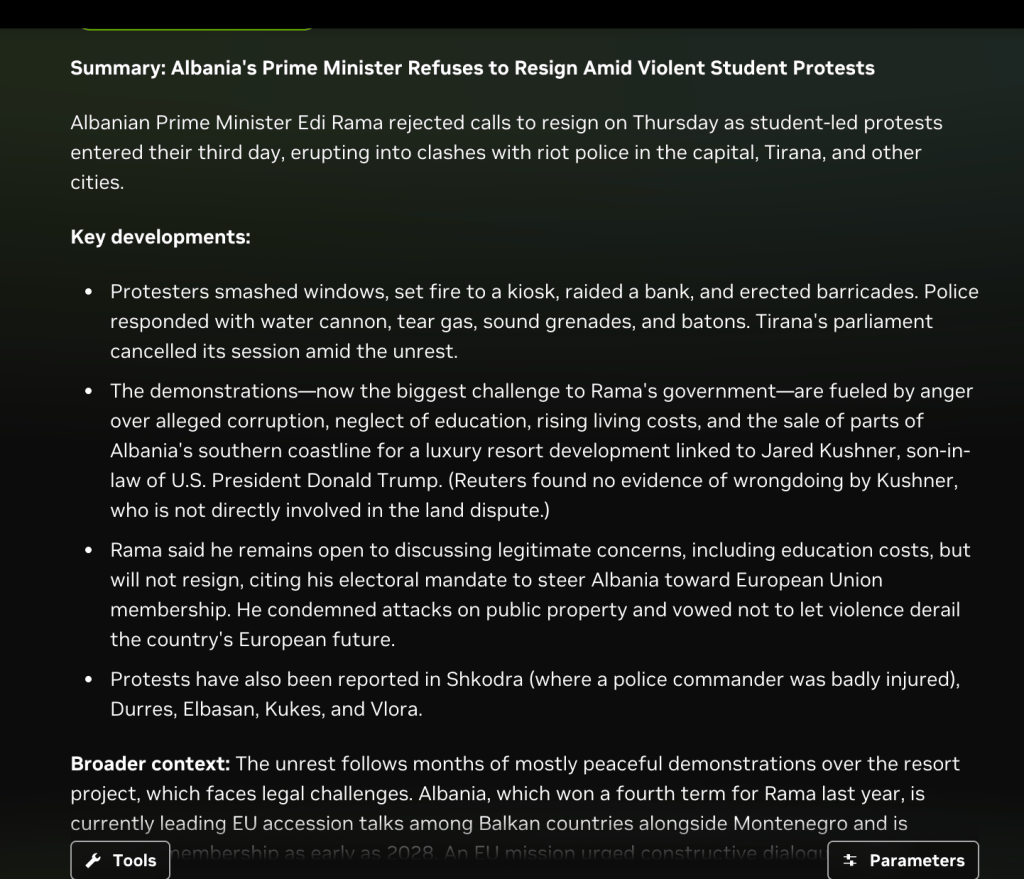
I fed it an interesting article on student protests in Albania. I don’t really have time to read the whole article. Maybe Nemotron can help.
Nemotron produced a great bulleted summary of the article from Reuters. It explained that the cost of living is a key driver of the protests.
Nemotron created this summary in seconds. I’m giving this round an A.
Round #2: Evaluating the Debt Risks of the Hyperscalers
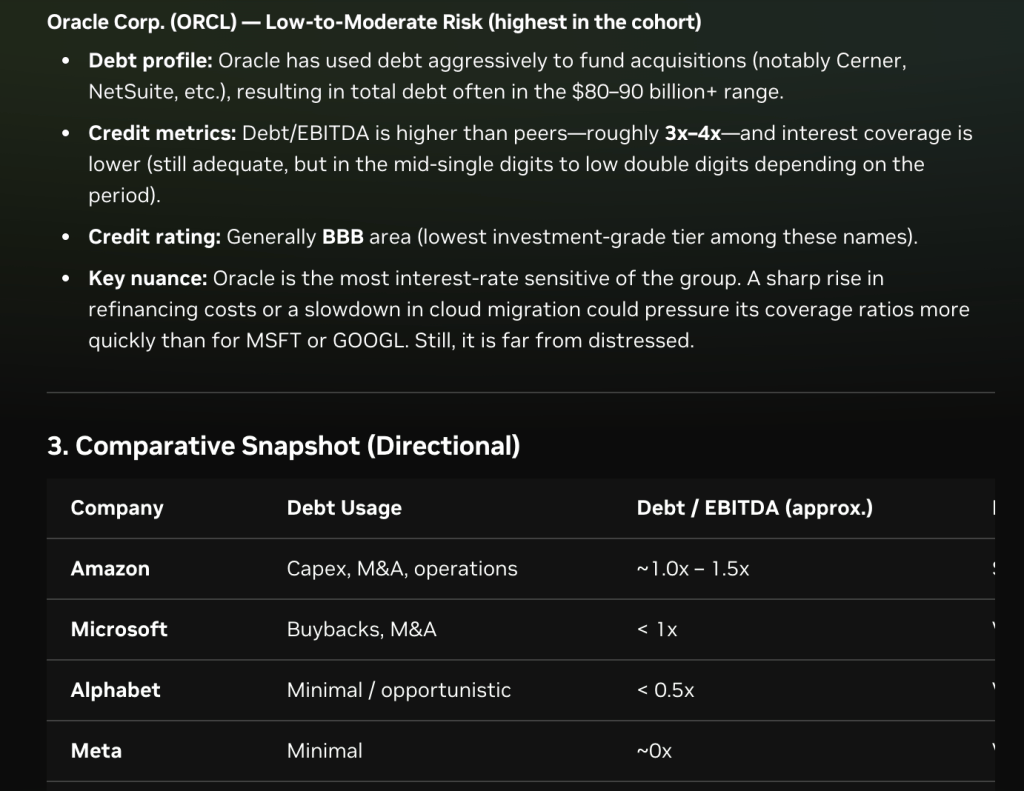
For our second round, I gave Nemotron something harder: analyzing the debt risks of the hyperscalers.
Nemotron produced a great report. It found that almost all the hyperscalers have low debt relative to earnings. The one exception is Oracle, with debt of 3 to 4 years of EBITDA.
Nemotron didn’t cite any sources. That’s because the NVIDIA playground doesn’t have a web search tool connected. Connect one, and I’m pretty sure the sourcing will be solid.
Nemotron’s reasoning was clear and convincing. NVIDIA earns another A for this round.
Round #3: Making a Personal Landing Page
Nemotron is great at parsing data, but we all know the biggest use for AI: coding. So I told Nemotron to make me a personal landing page.
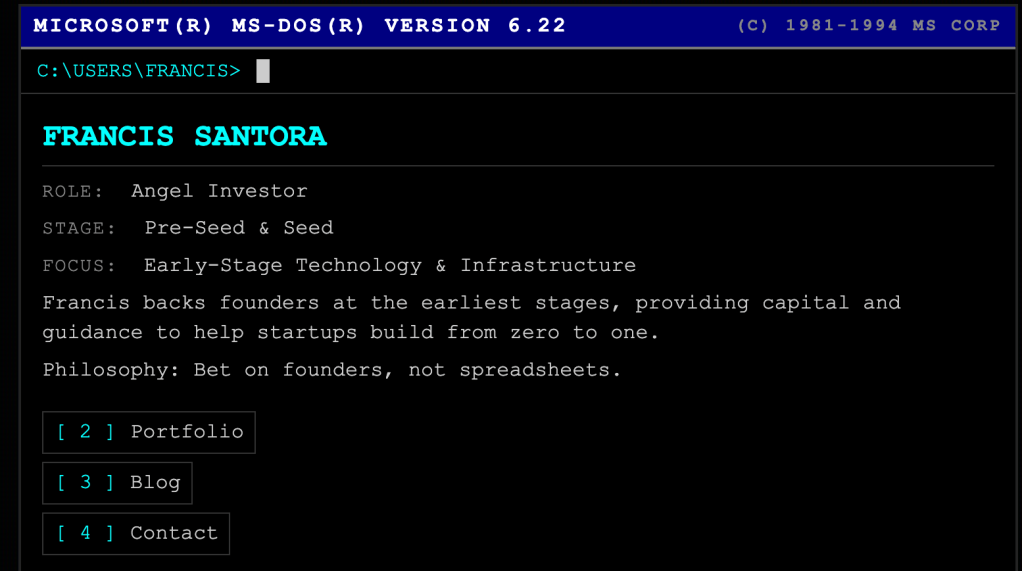
I instructed it to mention my investments in Micro1 and Rilla. I asked for a throwback, MS DOS look.
In seconds, Nemotron made me an awesome landing page with everything I asked for.
I can even click into the portfolio and see my top investments. And it really does look like DOS!
Nemotron earns an A+ for this round.
Wrap-Up
Nemotron really impressed me today. I’m giving it an A overall.
If you want a powerful open-source model, you no longer have to rely on the Chinese. Nemotron has you covered. And if you’re tired of overpaying for frontier models, Nemotron is a great solution.
Give Nemotron a try and build some amazing tools for less!
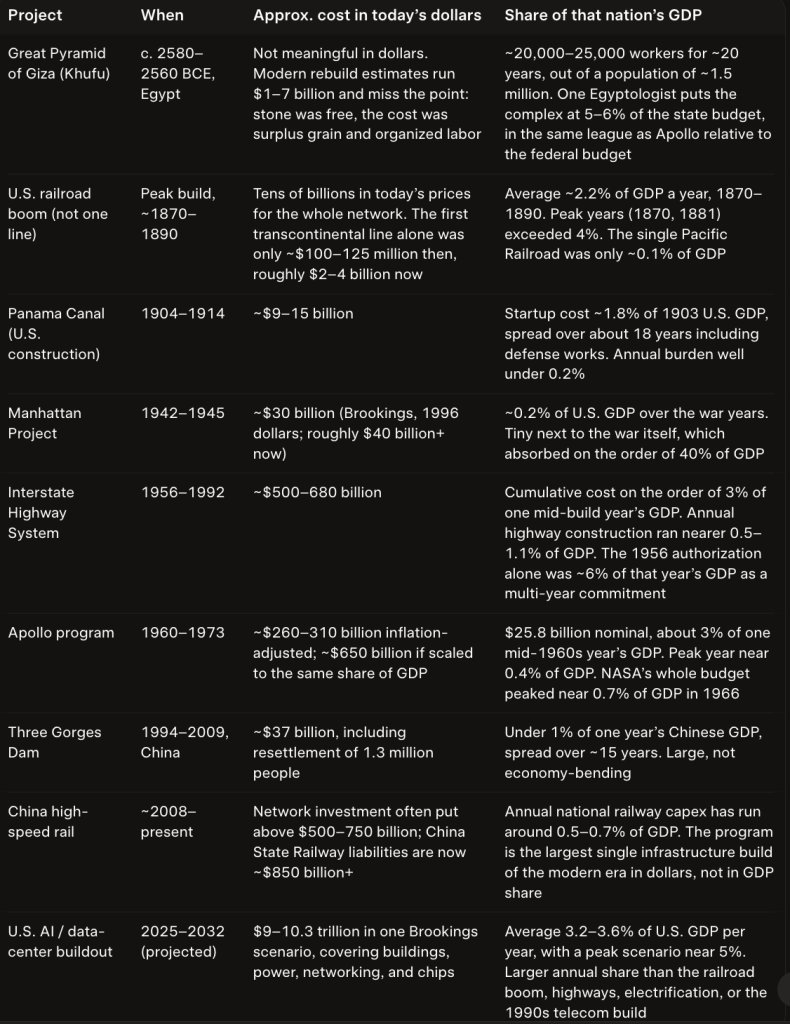
The Pyramids of Giza cost around 1% of Egypt’s GDP*. The AI buildout is over 3% of GDP. AI is bigger than the pyramids.
The AI buildout also dwarfs the Manhattan Project, the Three Gorges Dam, and Chinese high-speed rail. All were under 1% of their country’s GDP.
The only project that compares: the construction of the U.S. railroads.
In peak years from 1870-2, railroads accounted for 4% of GDP, comparable to the AI buildout. But overall, expenditure on railroads ran about 2% of GDP per year from 1870-90.
If the AI buildout continues at this pace, it will be the biggest infrastructure project in human history.
What This Means for Markets
In 1900, railroads were 63% of the value of the stock market. Today, the Mag 7 are 35% of the S&P 500.
The railroad era shows us that during a capex boom, the companies doing the buildout become enormously valuable. This is historically normal.
Seven companies accounting for such a large share of the market has never happened in our lifetime. But given the scale of the AI buildout, it makes sense.
Selling to the Hyperscalers: The Best Business in Town
In the biggest capex boom ever, there’s no better business than selling to the hyperscalers.
They’re spending a large and rapidly growing share of GDP to build out AI. If you can help, you make a fortune.
I’ve made one investment after another in AI infrastructure. I have three companies handling different aspects of the data market: Micro1, Hub, and Cortex AI. I also have Brick, which helps data centers reduce energy costs.
If there’s one thing I’ve learned in my career, it’s to put myself in a market that’s growing really fast. I did it with medical software back in the 2000s, and I’m doing it with AI today.
Wrap-Up
As I write this, I’m sitting in a red wingback chair in my living room. Everything around me was brought via rail.
This chair, the footstool, the coffee I’m drinking. All possible because of a massive capex buildout.
The AI buildout will make possible things we cannot imagine. We will have access to unlimited intelligence.
Is that worth 3% of GDP? Absolutely.
*Note: Egyptologist Jose Miguel Parra estimates that the Pyramids of Giza cost about 5-6% of Egypt’s state budget. It’s difficult to know what percent of the economy went to the state in taxes, but one study finds that Egypt’s government took 15-20% of all grain harvested in the kingdom. Grain was the primary source of wealth at the time. If the Pyramids at Giza were 6% of the state budget and the budget was 20% of the economy, that would mean the pyramids cost about 1.2% of GDP.
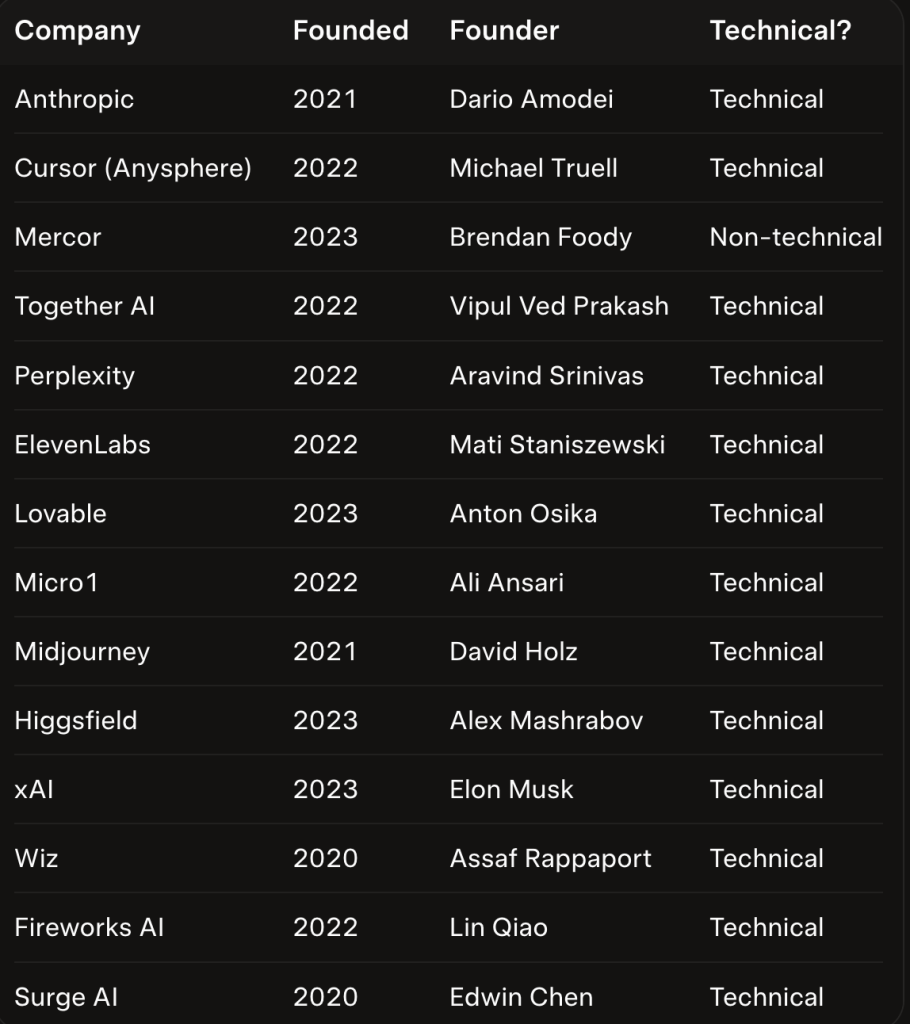
14 companies founded in the 2020’s have hit $500M ARR. 13/14 have a technical founder. This is why I back builders.
Analyzing the Top Startups of the 2020’s
Here is a list of every company founded in the 2020’s that has hit $500M ARR, along with the founder and CEO’s background:
Only one non-technical founder makes the list: Brendan Foody. He studied Economics at Georgetown but dropped out to start Mercor.
Brendan may be non-technical, but he has an exceptional background. Before Mercor, he was a Thiel Fellow.
Inside a Top Startup: My Investment in Micro1
Take the example of Ali at Micro1, my most successful investment so far. Ali has degrees in Comp Sci from Berkeley and Stanford, two of the top programs.
Because Ali is deeply technical, he knew what AI systems were capable of. He was able to build the right product at the right time.
When the company was just getting off the ground, Ali could write a lot of the code himself. This surely saved a lot of money, ensuring survival until they hit product-market fit.
How This Data Informs My Investments
I’m not likely to back a non-technical CEO. The data shows us technical founders are winning.
A non-technical founder would need some exceptional accomplishments. Even then, he’d need at least one technical co-founder.
If we’re starting a pizzeria, somebody has to know how to make pizza!
Wrap-Up
If you’re deeply technical with no business background, you should still consider starting a company. Technical founders have an amazing track record.
If you’re non-technical, don’t give up! Amazing founders like Brendan show us it’s still possible to succeed.
Just make sure you get some serious engineers around you. Together, you can build something great.
28 founders asked me for a meeting — on a single Sunday! I can’t meet 28 people a day. Here’s how I decide who gets a meeting…
How I Decide Which Founders to Meet
To pick which founders I should meet, I look for the most viable startups. Here’s how I assess that:
Launched product
Builder founders
At least 3 paying customers
Located in a region I cover (US/Japan/Canada/UK/Ireland/Sweden/Australia/New Zealand)
Incorporated properly (Delaware C corp)
If a startup checks those boxes, I’ll generally meet with them. If not, I’ll explain why they don’t meet my criteria and ask them to follow up if anything changes.
What to Do If You Can’t Get Meetings
Are you struggling to get meetings? Go through my checklist and see if you meet the criteria.
If you do, and you message investors that invest in your country and stage, you should get meetings.
But if all you have is an idea, don’t expect to get on a VC’s calendar.
Everyone has ideas. If they met with everyone who has an idea, they’d never sleep!
Wrap-Up
Just because you can’t get a meeting right now doesn’t mean your company is doomed.
The company that doesn’t look strong right now could be a big winner in the future!
Get together a team of builders, launch a product, get a few customers. If you can do that, investors will be fighting to meet you.